Use this stage-gate SEO diagnostic framework to distinguish discovery, crawling, rendering, indexing, ranking and click-through failures—and route each one to the right owner.
“This URL has no organic traffic” is a symptom, not a diagnosis. Google may not know the URL, fetching or rendering may have failed, another URL may have been selected as canonical, or the indexed page may lack relevant search visibility. In crawling vs indexing vs ranking diagnosis, the rule is simple: find the earliest failed gate before changing anything downstream.
One symptom, several different incidents
Imagine a newly published guide with no sessions attributed to organic search. One person wants more internal links. Another proposes a rewrite. A third repeatedly requests indexing. Engineering sees a 200 response and closes the ticket.
The symptom supports none of those actions by itself. Traffic combines technical eligibility, search demand, visibility, clicks and measurement. A failure in any one of them can produce the same graph.
Start with scope, test the gates in order and stop at the first confirmed failure. Record the evidence, route the issue to its owner, make the smallest supported change and then verify the same gate.
| Possible incident | Plausible explanation | Likely owner |
|---|---|---|
| Google has not found the URL | No durable internal discovery path; an orphaned or incorrectly formed URL | Technical SEO |
| Google knows the URL but cannot retrieve or process it reliably | Robots restriction, redirect failure, DNS or server problem, or missing rendered content | Engineering with technical SEO |
| Google processed the page but did not retain this URL as the representative | Noindex, soft-404 treatment, duplication or another selected canonical | Technical SEO, content or engineering |
| The intended URL is indexed but has little relevant exposure | Limited demand, weak query fit, competing site pages, insufficient usefulness or authority, or contextual SERP differences | Content, technical SEO or authority team |
| The result receives impressions but few clicks | Weak result presentation, changed demand or a SERP layout shift | Content and analytics |
| Search visibility is stable but reported sessions fall | Analytics, consent, attribution, filtering or URL-normalization failure | Analytics |
The search pipeline—and what each gate proves
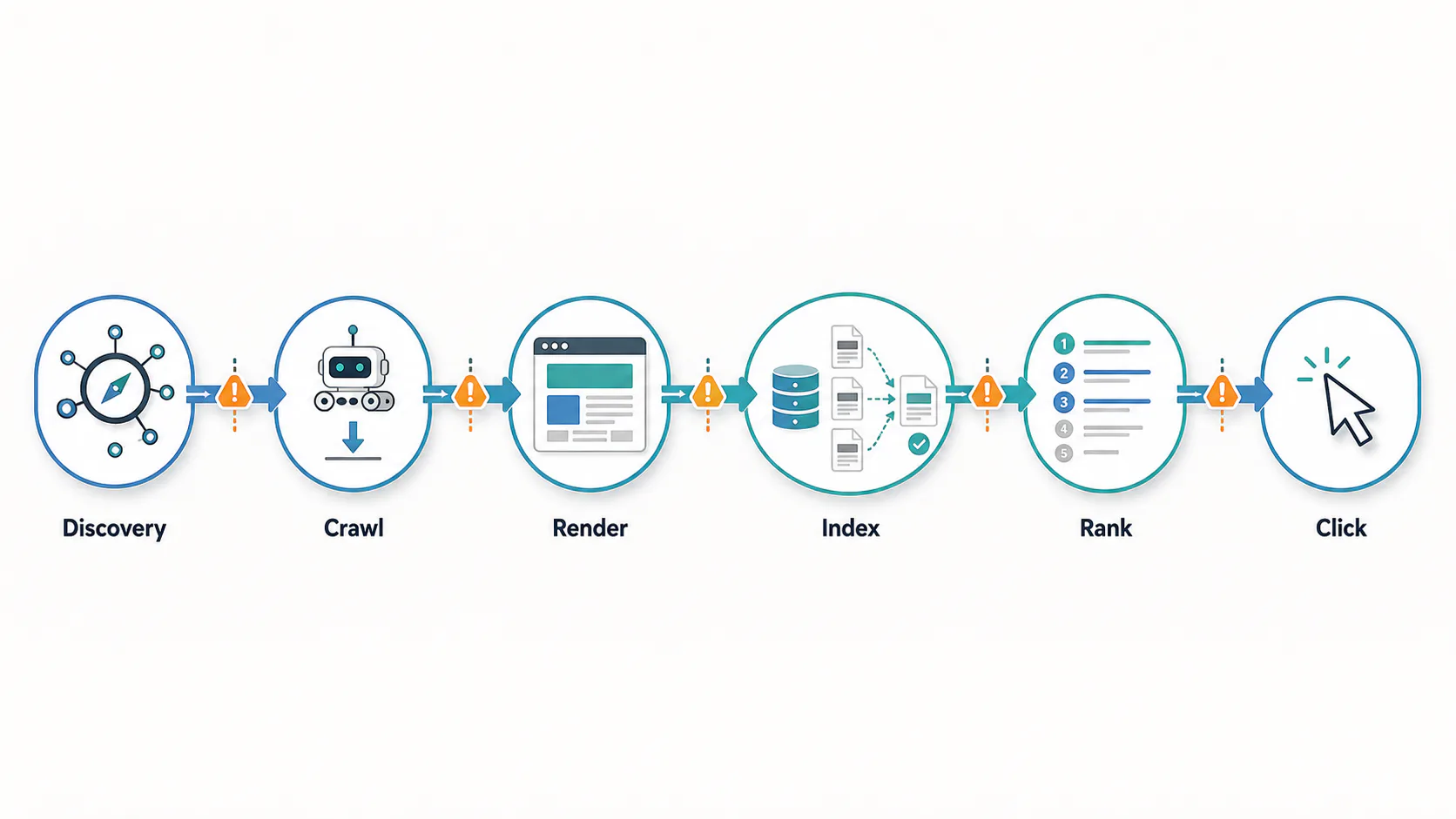
Google documents three high-level stages: crawling, indexing and serving search results. What SEO teams commonly call ranking happens during serving, when Google matches and orders indexed material for a specific query. URL discovery precedes fetching; rendering is an intermediate processing check that is particularly important for JavaScript-dependent pages. Google’s Search documentation explains this model.
The distinctions matter. Sitemap inclusion is not proof of a crawl. A 200 response is not proof that meaningful content rendered. Crawling is not indexing, indexing is not ranking, and an impression is not a click.
| Gate | Passing it establishes | It does not establish |
|---|---|---|
| Discovery | Google has learned that the URL exists. | The URL was fetched, rendered or indexed. |
| Crawling | Googlebot requested the URL and received a response. | The response contained useful content or led to indexing. |
| Rendering check | The processed output exposes the intended content, links and directives. | Google will index this URL or select it as canonical. |
| Indexing and canonicalization | Google processed the page and stored information for a canonical cluster. | This URL will appear for a particular query or earn traffic. |
| Ranking during serving | An eligible result was selected and ordered for a particular search context. | The searcher noticed or clicked it. |
| Click-through | A user clicked the result. | The visit converted or satisfied the user’s need. |
Google does not guarantee that it will crawl, index or serve every page, even when the page follows Search Essentials. Technical compliance establishes eligibility or an observed state—not entitlement to inclusion or visibility.
Start with scope before diagnosing a URL
A correct URL-level finding can still produce the wrong response when the incident’s scope is misunderstood. One unpublished page, every URL on a new template and an entire hostname losing visibility are different events.
First establish whether the loss is in search visibility, clicks or measurement. Seasonality, report latency, migrations and filtering can also distort comparisons.
Then inspect representative URLs. Group repeated failures by the narrowest shared property supported by evidence: template, directory, hostname, locale, content type or deployment. “Pages disappeared” is vague; “public product pages released after deployment X return an empty rendered body” is testable.
| Step | What to do | Primary owner |
|---|---|---|
| 1. Confirm the symptom | Check analytics tags, consent behavior, attribution rules, filters, date ranges and URL normalization. Compare Search Console clicks with analytics sessions without expecting the figures to match exactly. | Analytics |
| 2. Define the affected set | Record the first observed date and compare affected with unaffected URLs across templates, directories, hostnames, locales and content types. | SEO lead |
| 3. Look for a shared change | Review releases, migrations, routing rules, canonical or robots templates, CDN controls and CMS changes near the onset. | Engineering and technical SEO |
| 4. Test the scope | Inspect one affected URL and a comparable unaffected URL, then sample more pages only if the first evidence suggests a pattern. | SEO lead |
| 5. Check exceptional conditions | For a broad or suspicious loss, review Manual Actions and Security Issues alongside availability and deployment evidence. Do not infer a penalty from the size of the decline. | SEO lead and security |
Use evidence according to what it can prove
For a specific URL, URL Inspection separates Google’s stored record from the current page. The indexed result is not a live test. The live test assesses present accessibility, but it does not test every indexing condition, predict canonical selection or guarantee inclusion. It can also follow a redirect without showing the redirect or final tested URL, so corroborate redirects independently. See the URL Inspection documentation.
At pattern level, Page Indexing groups reported states while Crawl Stats helps investigate host availability, response classes and fetch behavior. Crawl Stats URL examples are representative, not comprehensive; an absent URL proves little. See the Crawl Stats documentation.
Performance data becomes diagnostic after eligibility is established. Search Console defines impressions, clicks and CTR, while average position is an aggregate—not a permanent rank. Results also vary by time, place, device and user context. See the Performance report documentation.
The query table is incomplete because anonymized queries are omitted and other rows may be truncated. Most performance data is assigned to the canonical URL rather than a duplicate. Those limits make an empty URL or query row inconclusive by itself. See Google’s dimensions and data-grouping guidance.
| Evidence source | What it can establish | What it cannot establish |
|---|---|---|
| HTTP and redirect test | The current response, headers, redirect path and final destination seen by that test client. | Past Googlebot access, rendered content, indexing or ranking. |
| Rendered-page inspection | Whether meaningful content, links, metadata and directives appear after the current page is processed. | What Google stored during its last indexing attempt. |
| Server logs | A timestamped request and server response; crawler identity should be verified before attribution. | Successful rendering, canonical selection, indexing or visibility. |
| URL Inspection: indexed result | Google’s stored information for the URL, including recorded crawl and canonical data where available. | The current live state after later page changes. |
| URL Inspection: live test | Whether Google’s inspection crawler can currently access and process the tested destination. | Actual inclusion, every indexing condition or the canonical Google will ultimately select. |
| Page Indexing report | Patterns among URLs known to Google and their reported index states. | A definitive root cause for every URL in a category. |
| Crawl Stats | Host-level request, response and availability patterns, with representative URL examples. | A complete crawl history for a particular URL or proof of indexing. |
| Sitemaps report | Whether a sitemap was submitted and could be read, plus the inventory it contained. | Crawling, indexing or ranking of each listed URL. |
| Performance report | Recorded impressions, clicks, CTR and aggregated position for selected dimensions and dates. | An exhaustive query list, a fixed rank or proof that a URL with no data is unindexed. |
| site: query | A non-exhaustive clue about URLs Google may be indexing and serving. | An exact index count or definitive status for an omitted URL. |
Separate proof from clues. A timestamped log response can confirm a fetch once crawler identity is validated. A sitemap entry only supplies a possible discovery route. A Search Console category describes an observed state, but its root cause may still require HTTP, rendering, canonical and template evidence.
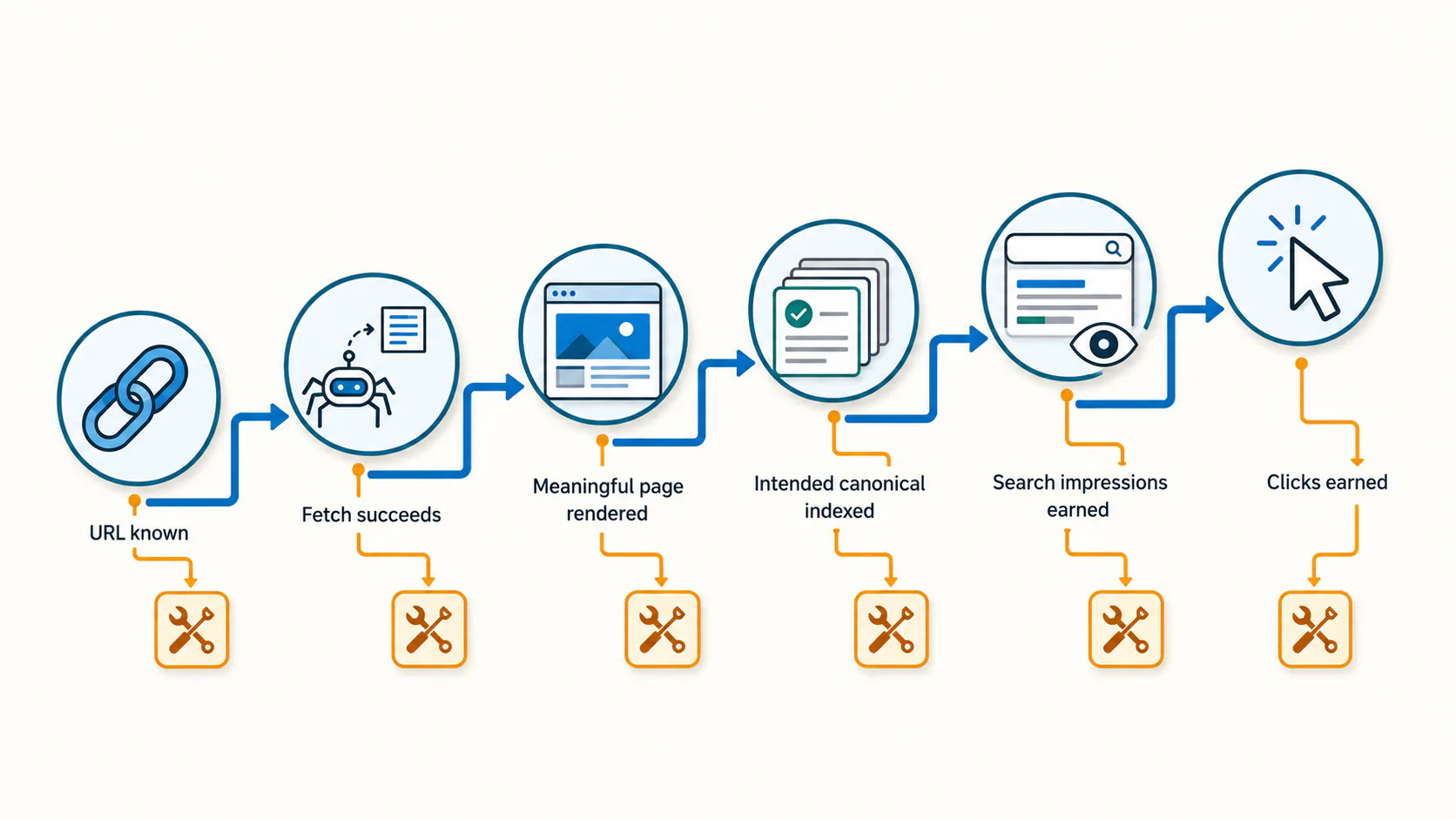
Run the crawl–index–rank decision tree
Move through the gates in order and stop at the first confirmed failure. Later-stage improvements cannot correct an earlier break, while simultaneous changes across several gates make validation harder.
- Gate 1 — Known and discoverable. Check the exact URL in URL Inspection. Then examine crawlable HTML links and sitemap membership as discovery routes, not proof of discovery. Confirm protocol, hostname, path and redirect behavior. A submitted orphan URL may still be weakly connected to the site. A sitemap helps discovery but does not guarantee crawling or indexing, according to Google’s sitemap guidance.
- Gate 2 — Fetchable. Test robots.txt against the exact URL, follow the full redirect chain and inspect the final response. Check authentication, CDN and firewall rules, DNS reliability and intermittent 5xx responses. One successful browser request does not exclude an intermittent or crawler-specific problem.
- Gate 3 — Meaningfully rendered. Compare the initial response with the rendered HTML. Confirm that the primary content, links, canonical and robots directives appear without user interaction. Blocked resources or failed scripts can leave the processed page incomplete even when the server returns 200. Google’s JavaScript SEO guidance describes crawling, rendering and indexing for JavaScript applications.
- Gate 4 — Indexable and selected. First ask whether the URL belongs in the index. Redirects, deliberate noindex pages, duplicates, facets and valid alternates can be healthy exclusions. If the URL should be indexed, inspect meta robots, X-Robots-Tag, status and soft-404 signals, declared canonical, Google-selected canonical, content similarity and internal linking. A self-referencing canonical is a signal, not a command.
- Gate 5 — Earning impressions. Once the intended canonical is indexed, investigate visibility by query and context. Determine whether measurable demand exists, whether the page solves the same task as competing results, whether another site URL overlaps and whether the page supplies enough useful information and authority. Language, location, device, freshness and SERP composition can affect serving. Treat proposed ranking causes as hypotheses.
- Gate 6 — Earning clicks. If exposure remains comparable while clicks decline, do not relabel the incident as indexing failure. Segment Performance data and inspect the live result page. The title, generated snippet, result type, competing features or underlying demand may have changed. Because average position is aggregated, compare compatible query and device cohorts before calling position stable.
| Gate | Decision question | Confirm with | Smallest sensible response |
|---|---|---|---|
| 1. Known and discoverable | Does Google know the exact URL, and does it have a durable discovery path? | URL Inspection status; crawlable internal links; sitemap evidence; exact protocol, hostname and path. | Add an appropriate internal link, correct the URL inventory or remove an unintended URL. |
| 2. Fetchable | Can Googlebot retrieve the intended destination reliably? | Robots permission; redirect chain; final status; URL Inspection fetch data; logs; host availability. | Correct the specific access, routing, DNS, firewall or server defect. |
| 3. Meaningfully rendered | Does processing expose the intended content, links and directives? | Rendered HTML and screenshot; loaded resources; initial-versus-rendered comparison. | Repair blocked resources, runtime errors or interaction-dependent output. |
| 4. Indexable and selected | Should this URL be indexed, and did Google choose it as the representative? | Meta robots; X-Robots-Tag; soft-404 state; declared and Google-selected canonicals; duplication evidence. | Remove an accidental directive, align canonical signals, differentiate or consolidate content, or accept a healthy exclusion. |
| 5. Earning impressions | Does the indexed page match identifiable searches strongly enough to be served? | Page- and query-level impressions; demand research; intent comparison; competing site URLs; internal and external link context. | Improve query fit and usefulness, consolidate overlap, or strengthen relevant authority. |
| 6. Earning clicks | When the result appears, is it attracting the intended searcher? | Impressions, position and CTR segmented by query, country, device, search appearance and date. | Align the title and snippet promise or respond to changed demand and SERP composition. |
“Discovered—currently not indexed” means Google found the URL but has not crawled it. “Crawled—currently not indexed” means Google crawled the page but did not index it, and Google says there is no need to resubmit that URL for crawling. The first state returns the investigation to discovery, inventory and fetch patterns; the second moves attention toward rendering, directives, canonicalization, duplication and page value. The labels describe states, not complete root causes. See the Page Indexing report definitions.
Worked incident: a canonical defect disguised as a ranking problem
Consider a hypothetical SaaS guide at `/docs/export-audit-data`. Analytics reports no organic visits, and the URL has no apparent page-level Performance data.
The team records evidence gate by gate. Google had fetched and rendered the guide, but the indexed record identifies the broad documentation hub as Google-selected canonical. The child template accidentally inherited the hub’s canonical URL.
Rewriting the article or starting link outreach would be premature. The smallest supported response is to correct the canonical output, verify the scope across representative child pages and wait for Google to process the changed signal. Search Console normally attributes performance to the canonical URL, so the child page’s empty Performance row is consistent with the finding—but did not prove it on its own.
| Checkpoint | Hypothetical evidence | Decision |
|---|---|---|
| Discovery | The guide is linked from the documentation hub and listed in the submitted sitemap. | The URL has plausible discovery routes; this does not yet prove Google used them. |
| Fetch | URL Inspection’s indexed record shows a successful crawl. Server logs record a corresponding Googlebot request and 200 response after crawler identity is validated. | The fetch gate passed for that recorded visit. |
| Rendering | Google’s recorded HTML contains the full guide, title, internal links and directives. | A rendering failure is not supported by the available evidence. |
| Indexing controls | No noindex directive is present, and the guide declares itself canonical. | There is no explicit indexing prohibition, but the declared canonical is only one signal. |
| Canonical selection | The indexed record lists the documentation hub as Google-selected canonical. | The child URL was treated as an alternate; its empty page-level Performance row is not evidence of a ranking failure. |
| Action | Correct the template rule that emits the hub canonical on child guides, after sampling other child pages for the same defect. | Technical SEO specifies the expected signal; engineering implements and tests the template change. |
| Validation | Confirm that the live child page emits one correct canonical. Then look for a later Google crawl and updated indexed data selecting the intended URL. | Evaluate query impressions only after the canonical state changes. |
If the guide were already indexed as its own canonical but had no meaningful impressions, the investigation would continue at Gate 5: demand, intent, competing pages, usefulness, authority and search context. Passing the technical gates would narrow the diagnosis; it would not solve the visibility problem.
Route the confirmed failure to the right owner
Ownership should follow the evidence, not whoever first noticed the graph. Engineering owns access, response and rendering defects. Technical SEO owns discovery architecture, crawl controls, canonical signals and template patterns. Content owns intent, usefulness and consolidation decisions. Authority work starts only after technical eligibility and relevance are sound. Analytics owns measurement validation and demand-versus-CTR interpretation.
Each handoff should include the affected set, timestamps, evidence, current hypothesis, requested change and success condition. “Please investigate indexing” is vague. “Fourteen sampled product URLs began emitting an X-Robots-Tag: noindex header after deployment X” is actionable.
| Symptom | Confirming evidence | Owner | Smallest sensible action | Validation signal |
|---|---|---|---|---|
| Important URL remains unknown | URL Inspection reports it as unknown; current internal and sitemap checks reveal no durable route. | Technical SEO | Create an appropriate crawlable link and correct the sitemap inventory. | Google later recognizes the URL; crawl evidence can then be assessed. |
| Requests fail or resolve incorrectly | URL Inspection, verified logs or Crawl Stats show DNS, 5xx, firewall, redirect-loop or wrong-destination evidence. | Engineering | Correct the narrow infrastructure or routing defect. | Representative URLs return a stable intended response. |
| Rendered content is missing | Rendered output lacks the main content or required resources fail. | Engineering | Repair the rendering path or provide essential content reliably in processed HTML. | Rendered inspection exposes the intended content and directives. |
| Template directives conflict | Representative URLs share an accidental noindex, X-Robots-Tag or canonical output. | Technical SEO and engineering | Correct the affected template rule. | Live output is correct, followed later by updated crawl and index evidence. |
| URL is grouped under another canonical | Indexed data selects another canonical and duplication evidence supports the grouping. | Technical SEO and content | Accept an intentional alternate; otherwise consolidate, differentiate or align canonical signals. | The intended representative is selected, or the deliberate alternate remains correctly excluded. |
| Indexed page earns weak impressions | Technical gates pass; query evidence suggests weak demand, intent mismatch, overlap or limited usefulness. | Content with technical SEO | Address a defensible user need, consolidate competing pages or improve distinctive value. | Relevant-query impressions improve when compared over an appropriate period. |
| Relevant page appears under-supported | The page fits the task and is eligible, but internal prominence or credible external references are weak relative to competitors. | Technical SEO and digital PR | Improve contextual internal linking; pursue relevant editorial references where warranted. | Link evidence changes; visibility is then evaluated by relevant query cohorts. |
| Exposure holds while clicks fall | Comparable segmented data shows similar impressions and position but lower CTR. | Analytics and content | Validate measurement, inspect the SERP and revise the result promise where appropriate. | CTR improves, or evidence attributes the change to demand or SERP composition. |
| Analytics traffic falls without matching search loss | Search Console clicks remain broadly stable while analytics sessions decline after a measurement change. | Analytics | Repair tagging, consent or reporting configuration. | Controlled visits and reconciled reports restore measurement confidence. |
Five shortcuts that can send the investigation backward
These actions are not universally useless. The problem is that none identifies the failed gate by itself. Google’s robots.txt and noindex guidance distinguishes crawler access from index control. Its crawl-budget guidance treats detailed management as an advanced concern primarily for large or rapidly changing sites.
| Shortcut | Why it does not complete the diagnosis | Better response |
|---|---|---|
| Submit the sitemap again | Sitemaps support discovery but do not guarantee crawling or indexing. | Correct the sitemap only if its inventory or processing is part of the confirmed failure. |
| Keep using Request Indexing | A request asks Google to crawl the URL; it does not repair a recurring defect or guarantee inclusion. | Fix the underlying condition, then use a recrawl request selectively when it helps validation. |
| Block the page in robots.txt to remove it | Robots.txt controls crawler access. If crawling is blocked, Google cannot see a page-level noindex directive, and the URL can still appear based on other signals. | Use an accessible noindex directive or another removal method appropriate to the requirement. |
| Optimize crawl budget first | Detailed crawl-budget management is primarily intended for very large, rapidly changing sites or sites with many discovered-but-uncrawled URLs. | For an ordinary site, inspect the failed gate and URL inventory before making crawl budget the diagnosis. |
| Add more copy, keywords or links | Content and authority changes cannot repair a fetch, rendering, noindex or canonical defect. | Establish technical eligibility before choosing a ranking intervention. |
A `site:` query is not an index audit. Google says its returned URL list is not always exhaustive. Use URL Inspection for a particular URL and Page Indexing for patterns. See Google’s site: operator documentation.
Close the incident only after the failed gate passes
A deployment is not the end of an SEO incident. The original failure—not merely the implementation task—must be rechecked.
For an access defect, success means the intended response can be retrieved reliably. For a rendering defect, the processed page must expose its meaningful content and directives. For a canonical defect, the live output must first be correct and later indexed evidence must reflect the intended representative URL. Only then should the team interpret impressions and ranking behavior.
This validation order prevents teams from judging a downstream outcome before Google has processed the upstream change. It also turns technical SEO troubleshooting into a repeatable operational practice rather than a sequence of guesses.
- Capture the symptom and baseline before changing the page. Timestamp the evidence so the current live state is never confused with Google’s last recorded state.
- State one falsifiable hypothesis about the earliest failed gate. If two explanations remain plausible, collect evidence that can distinguish them before deploying a broad change.
- Apply the smallest supported fix. Preserve a rollback path for template-level robots, canonical, routing and rendering changes.
- Validate in pipeline order: current access, current rendered output, a later Google crawl, Google’s updated index state, then impressions, position and CTR.
- Do not promise a universal waiting period. Recrawling and index processing vary; record when the relevant evidence changes.
- Expand a template- or site-level remedy only after representative URLs confirm the same pattern. If a downstream weakness remains after the failed gate passes, open it as a separate, evidence-based problem.
| Field | What to record |
|---|---|
| Incident | Short name and ticket ID |
| URL and scope | Exact URL; affected template, directory, hostname, locale or content type; representative unaffected URL |
| Timing | First observed date; relevant deployment or migration date; timestamp for every test |
| Discovery | Known status; internal discovery source; sitemap membership and processing state |
| Fetch | Robots permission; redirect path; final status; recorded last crawl; validated log evidence |
| Rendering | Main content and directives present; critical-resource result; rendered HTML or screenshot reference |
| Indexing controls | Meta robots; X-Robots-Tag; declared canonical; hreflang when relevant |
| Google’s recorded state | Index status; Google-selected canonical; Page Indexing category; recorded crawl date |
| Performance | Queries, impressions, average position and CTR with country, device, appearance and date filters |
| Hypothesis | Earliest failed gate and supporting evidence |
| Action and owner | Smallest approved change; responsible team; rollback path |
| Validation | Current live result; later crawl evidence; updated index state; downstream visibility outcome; review date |
Crawling, indexing and ranking are not interchangeable labels for “Google traffic.” They are separate gates with different evidence, owners and remedies. Establish the scope, move from discovery toward click-through and stop at the first confirmed failure. Fix that condition narrowly, validate it with the same class of evidence and only then assess what happens downstream. The result is an actionable diagnosis without pretending that technical eligibility guarantees indexing, visibility or clicks.
Copy the incident record into your team’s issue tracker for the next visibility investigation. Keep every diagnosis tied to timestamped evidence, a named owner and a validation signal.